The Law-GAT is the HEC test that LL.B graduates must pass before enrolment as an advocate. You apply and pay online on the HEC Education Testing Council (ETC) portal.
| Official portal | etc.hec.gov.pk (HEC Education Testing Council) |
|---|---|
| Eligibility | LL.B (or equivalent) from a university recognised by the HEC / Pakistan Bar Council |
| Fee | Shown on the portal when you apply (reported as Rs 3,000 for 2026); non-refundable |
| Payment | 1Link 1Bill invoice: JazzCash, EasyPaisa, mobile banking or ATM |
| Test | 100 MCQs; pass marks 50 out of 100 |
| Result | Valid for 2 years; up to 7 attempts (as reported for 2026) |
Step by step
- 1
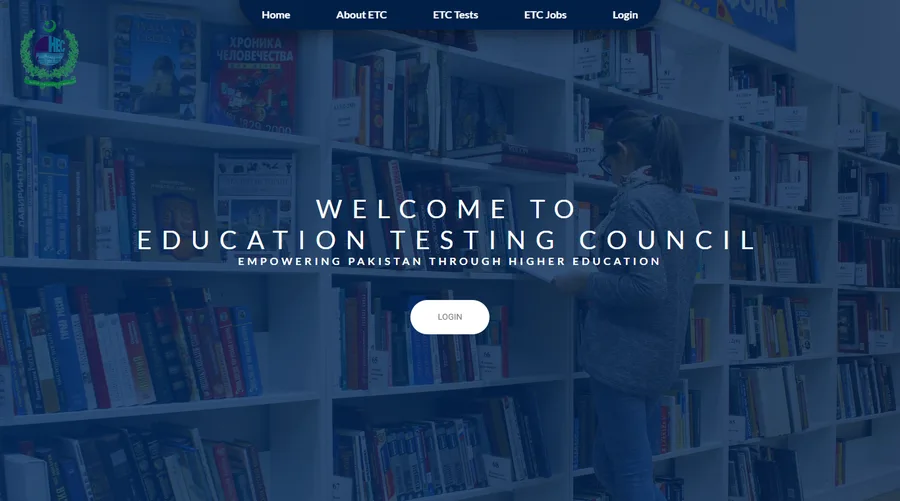
Open the HEC ETC portal
Go to https://etc.hec.gov.pk/ (HEC Education Testing Council) and click "Login" at the top. Tests that are open for registration appear under "ETC Tests".
 Screenshot of the HEC portal · click to enlarge
 - 2
Create your account (Signup)
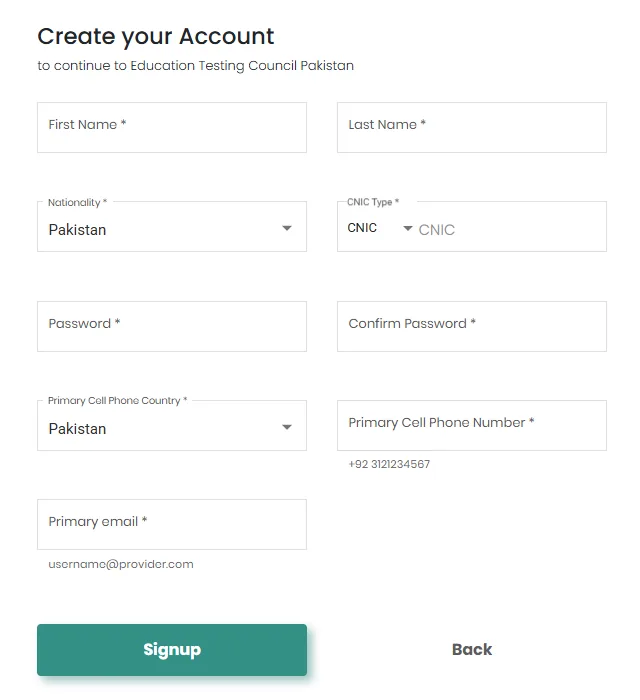
On the login page click "Signup" and fill in the form:
- First name and last name, exactly as on your CNIC
- Nationality and CNIC type, then your CNIC number
- A password (and confirm it)
- Your mobile number (e.g. +92 3121234567) and email address
 Screenshot of the HEC portal · click to enlarge
 - 3
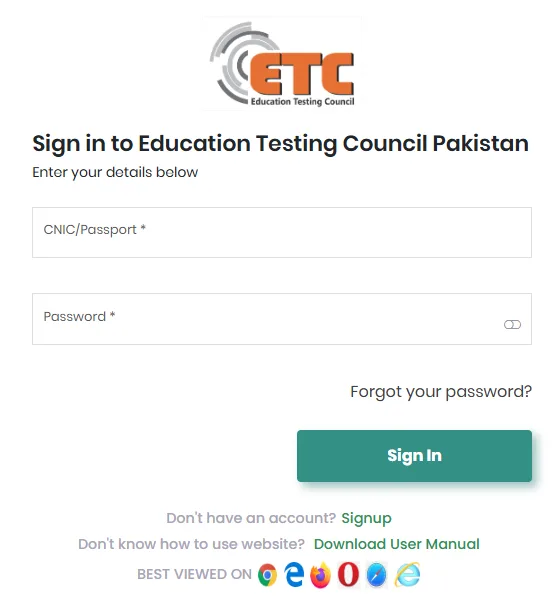
Sign in
Sign in with your CNIC / passport number and the password you set. If you forget it, use "Forgot your password?" on the same page.
 Screenshot of the HEC portal · click to enlarge
 - 4
Complete "My Profile"
Fill in your personal details and education record, including your LL.B, exactly as on your documents, and upload your photograph.
- 5
Apply for the Law-GAT
Choose the Law Graduate Assessment Test, select your test centre, check your name, CNIC and mobile number, and submit the application.
- 6
Pay the fee with the 1Bill consumer ID
After you submit, the portal shows a 1Link 1Bill invoice with a consumer ID (consumer number). Pay it in any of these ways and keep a screenshot or receipt:
- JazzCash app: Payments → Education → 1Bill → enter the consumer ID → Pay
- EasyPaisa app: Bill Payment → 1Link / 1Bill → enter the consumer ID → Pay
- Mobile or internet banking of your bank: Bill Payment → 1Bill Invoice / Voucher → enter the consumer ID
- Any ATM: Bill Payment → 1Bill → enter the consumer ID
- 7
Verify the payment on the portal
Go back to etc.hec.gov.pk and click "Verify Online Payment" on your dashboard. Your application is only complete when the status shows the fee as paid; applications left in "Save" or "Draft" are not processed.
- 8
Get your roll number slip
About a week before the test, HEC sends the roll number slip by email / SMS, and you can download it from the ETC dashboard.
- 9
On the test day
Reach the test centre before the reporting time.
- Bring the printed roll number slip and your original CNIC
- Mobile phones, smart watches and calculators are not allowed
- 10
Check your result
Download the result card from the ETC portal and keep it for your Bar Council enrolment.